Call Us: +91-7042640351, 9891868324

How to Fix a Laptop Body Swollen Due to Battery Bulge Safely
By Admin | 10 Nov 2025
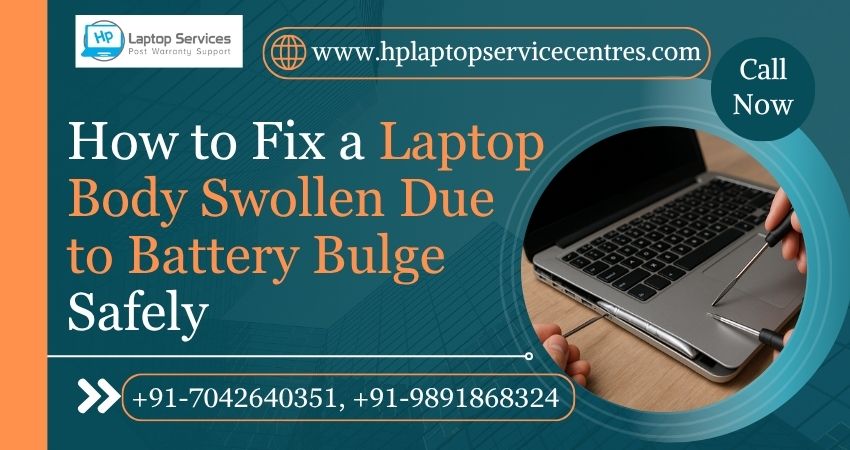
Have you noticed your laptop’s bottom panel bulging or your keyboard rising slightly? If yes, your laptop body may be swollen due to a battery bulge—a serious issue that requires immediate attention. Ignoring this can lead to overheating, permanent damage, or even fire hazards.
In this blog, we’ll help you understand why a laptop body swells due to battery issues, the dangers involved, and safe ways to fix it. We’ll also explain how HP Laptop Service Centers can help you repair or replace the damaged parts at affordable rates with doorstep service.
What Does It Mean When Your Laptop Body Is Swollen?
A swollen laptop body is usually caused by a bulging or damaged lithium-ion battery inside your laptop. Over time, laptop batteries may degrade due to overcharging, overheating, or internal chemical reactions, causing them to expand.
This swelling pushes against the internal components and the outer casing, making your laptop look bloated or uneven. In HP and other laptop brands, the battery is often built-in, meaning a swelling battery can press against the keyboard, trackpad, and motherboard, leading to serious hardware damage.
Common Signs of a Laptop Body Swollen Due to Battery Bulge
You may not always notice the issue right away, but here are some clear signs to watch for:
- The laptop base or bottom cover appears lifted or curved.
- The touchpad or keyboard feels raised or doesn’t click properly.
- You hear cracking sounds when opening or closing the lid.
- The battery isn’t charging or the laptop gets unusually hot.
- The laptop doesn’t sit flat on a surface anymore.
If you notice any of these warning signs, it’s best to stop using your laptop immediately and contact HP Laptop Service Centers for a professional inspection.
What Causes a Laptop Battery to Bulge?
A laptop battery bulge can be caused by several factors. Understanding these can help you prevent future issues:
1. Overcharging or Continuous Plugging In
Keeping your laptop plugged in constantly can overcharge the battery and degrade its internal cells.
2. High Temperature and Poor Ventilation
Using your laptop on soft surfaces like a bed or couch can block air vents, leading to overheating and battery stress.
3. Old or Faulty Battery
Every battery has a life cycle. An old or defective battery is more prone to chemical instability and swelling.
4. Non-Genuine or Low-Quality Chargers
Using duplicate or incompatible chargers can deliver inconsistent voltage, which damages the battery.
5. Internal Short Circuit
A damaged battery cell may short internally, leading to heat buildup and gas expansion inside the pack.
Why You Should Never Ignore a Swollen Battery
Many users continue to use laptops with swollen batteries, thinking it’s a minor issue. But here’s why that’s dangerous:
- Fire Hazard: The gas buildup inside the battery can cause it to rupture or explode under pressure.
- Hardware Damage: The swelling can push against the motherboard, trackpad, and keyboard, permanently damaging them.
- Data Loss: If the battery fails suddenly, you could lose unsaved data or damage your storage drive.
- Safety Risk: A leaking or ruptured battery emits toxic chemicals that are harmful to skin and lungs.
In short, a laptop body swollen due to battery bulge is not just a cosmetic issue—it’s a critical safety concern.
How to Fix a Laptop Body Swollen Due to Battery Bulge Safely
Here’s what you can do (and what you should not do) if your laptop is showing signs of battery swelling:
Step 1: Power Off Immediately
Shut down your laptop and unplug it from the charger. Avoid pressing hard on the swollen area, as it can rupture the battery.
Step 2: Do Not Try to Puncture or Remove It Yourself
Never try to open the laptop body or remove the swollen battery without professional tools. A swollen battery is fragile and can release flammable gases if punctured.
Step 3: Use Genuine Replacement Parts
Always replace your battery with an original HP battery or an approved equivalent. Avoid local or cheap batteries that can fail quickly.
Step 4: Regular Maintenance
Schedule periodic laptop maintenance to clean dust, check ventilation, and monitor battery health.
Why Choose HP Laptop Service Centers?
At HP Laptop Service Centers, we provide end-to-end solutions for laptop body swelling and battery-related problems across all HP models and other major brands.
Here’s why thousands of users trust our services:
- Expert Technicians: Skilled in diagnosing and fixing complex battery and body swelling issues.
- Affordable Rates: Get quality repair without paying high brand-store prices.
- Doorstep Services: We offer quick pickup and drop repair options at your convenience.
- Multi-Brand Repair: We repair not only HP but also Dell, Lenovo, Acer, ASUS, Apple, Samsung and other major laptop brands.
- Out-of-Warranty Support: Even if your laptop warranty has expired, we provide cost-effective repair solutions.
Whether it’s a battery bulge, motherboard issue, screen damage, or heating problem, we ensure fast, reliable, and safe repairs.
Tips to Prevent Laptop Battery Swelling
Prevention is always better than repair. Follow these simple tips to extend your battery life and prevent future swelling:
- Avoid constant charging—unplug once it reaches 100%.
- Keep your laptop cool—use it on a hard surface with good airflow.
- Use only genuine chargers recommended by your laptop brand.
- Don’t store your laptop in hot areas like cars or direct sunlight.
- Replace old batteries every 2–3 years or when performance drops.
Get Professional Help Today
If your laptop body is swollen due to a battery bulge, don’t delay the repair—it’s a safety risk that needs expert handling.
Contact HP Laptop Service Centers today for quick, reliable, and affordable solutions.
Call us now:
+91-7042640351 | +91-9891868324
Services Offered:
- Affordable repair and replacement solutions
- Doorstep laptop pickup and delivery
- Out-of-warranty support
- Multi-brand laptop repairs
Final Words
A swollen laptop body due to battery bulge is not just a performance problem—it’s a serious warning sign that your device needs attention. Acting quickly can save your laptop, protect your data, and keep you safe.
Trust the experts at HP Laptop Service Centers for professional repair, battery replacement, and long-lasting performance—all at affordable rates and with doorstep convenience.
Find us on Google - BSS Laptop Repair Center
Recent Post






Looking For A Fast & Reliable Laptop Repair Service
We have professional technicians, fast turnaround times and affordable rates. Book Your Repair Job Today!
We specialize in all types of laptop services and provide reliable and quality door step service to our clients